AI chatbot for your website
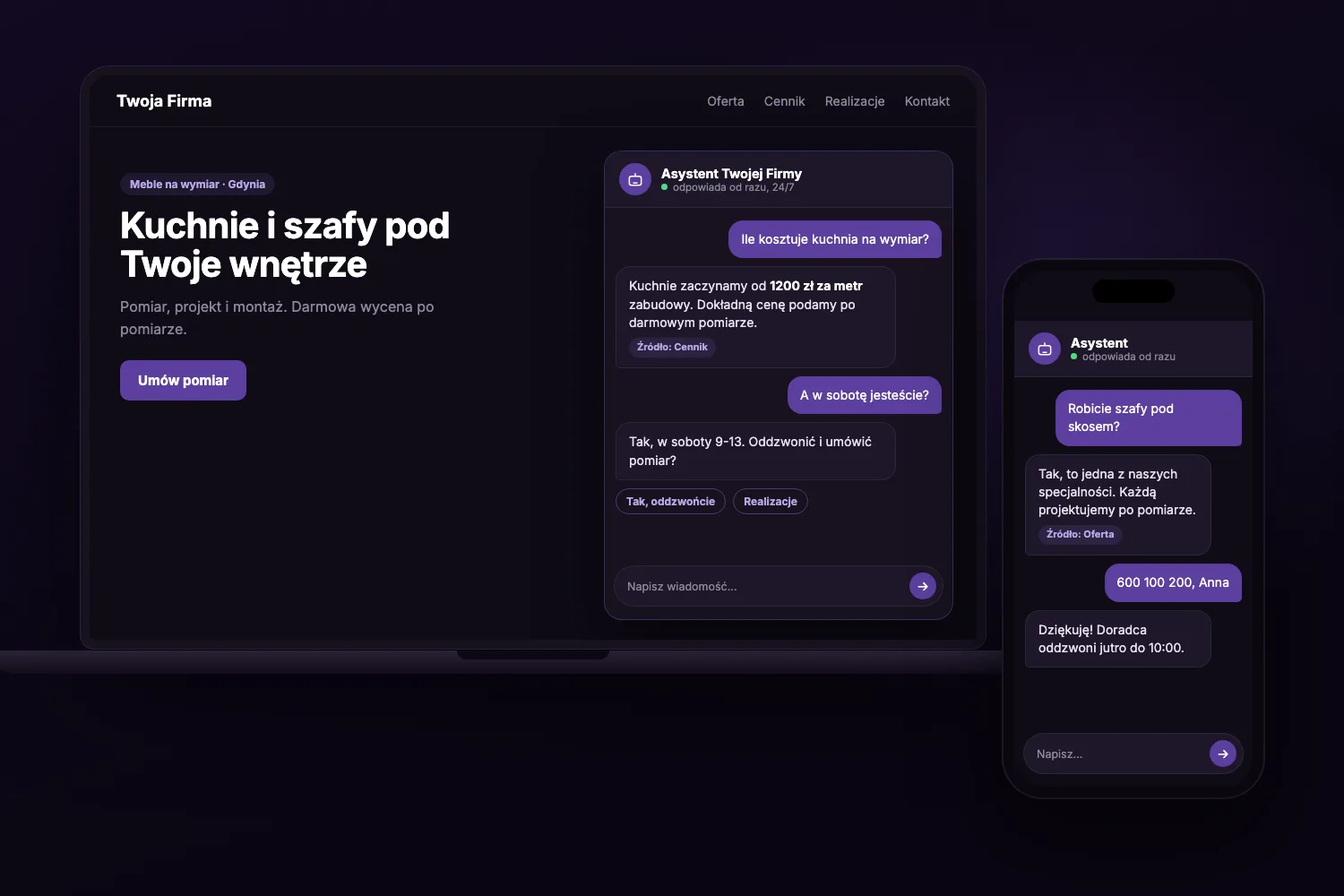
I set up an AI chatbot that answers your customers right away, including evenings and weekends. It knows the offer, the price list and the opening hours from your website, and when a customer wants to talk, it passes their number on to you.
Value
An assistant that knows your business
A customer browsing the websites of several companies in the evening wants to know three things: whether you do it, how much it costs and when you can do it. If they have to wait until morning for an answer, they are often already asking someone else.
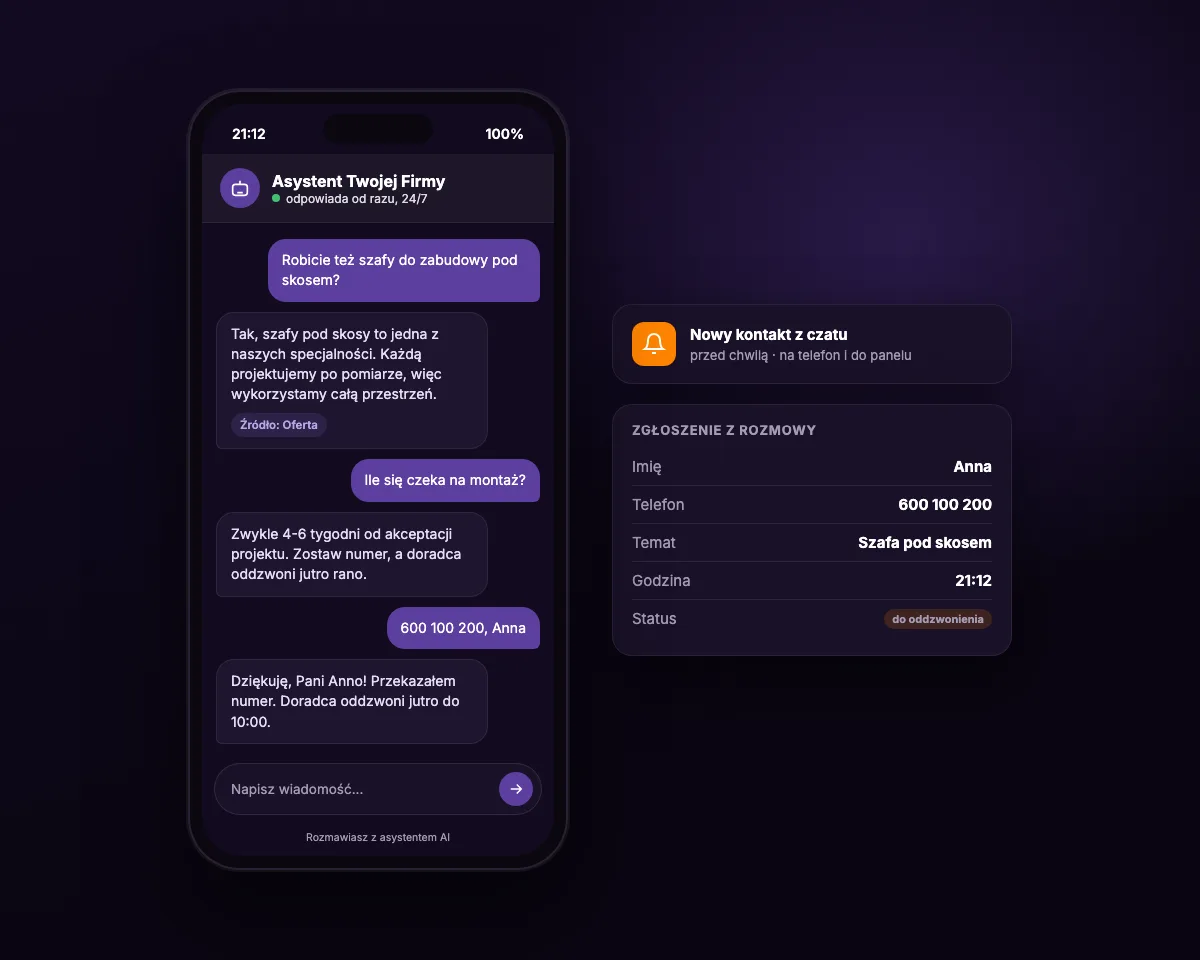
The AI chatbot answers those questions right away, in full sentences and in Polish. When the customer is ready to talk, the bot collects a name and phone number, and you get the enquiry on your phone and in the panel.
- Answers within seconds: at any time, including public holidays
- Leads to contact: suggests a call or a date instead of ending the conversation with the answer
- Never loses an enquiry: every number left goes to the panel together with the topic of the conversation
Knowledge
It answers from your website's content, not off the top of its head
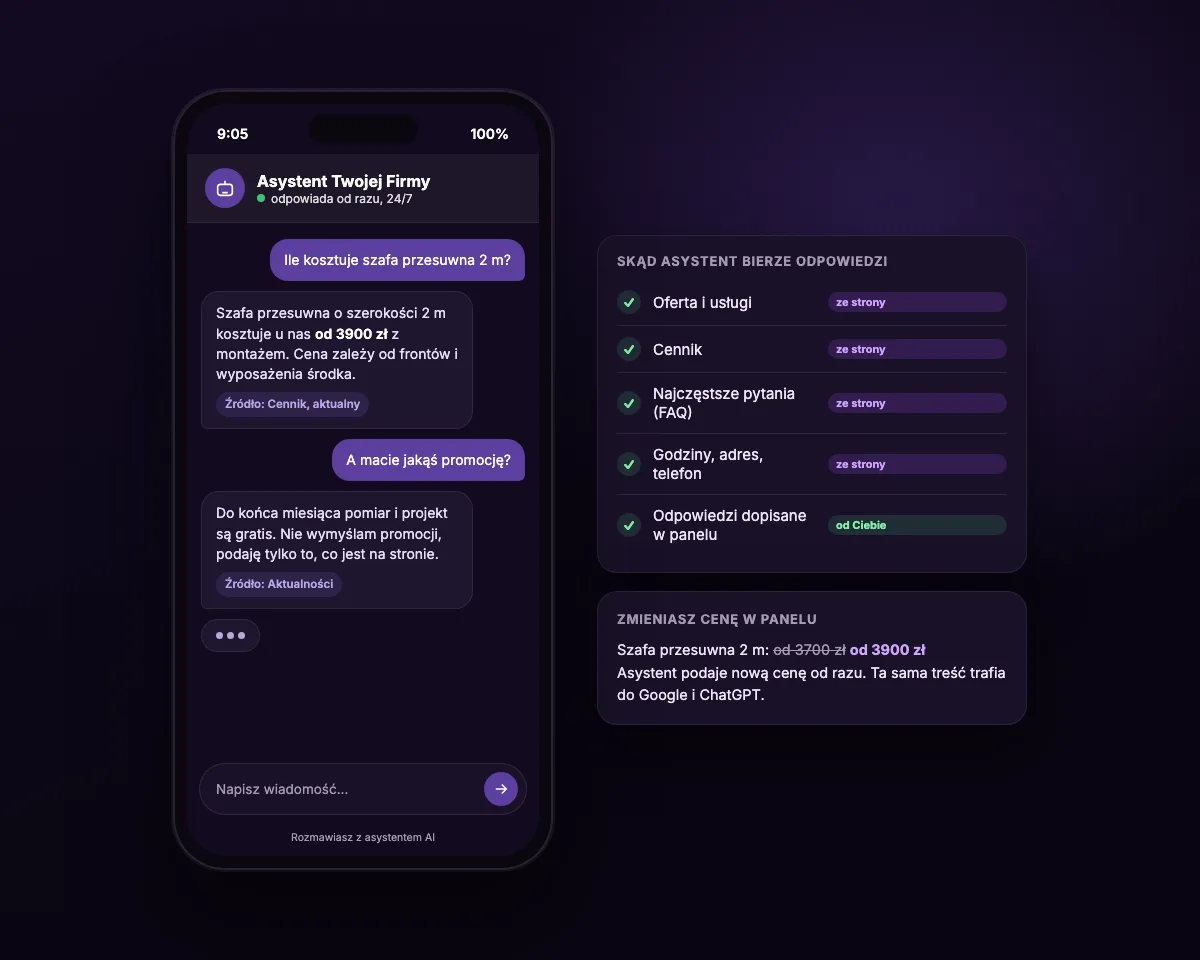
The bot does not guess. It takes its answers from what is on your website: the offer, the price list, frequently asked questions, opening hours and contact details. With an answer it can show where it came from.
You change a price in the panel and the bot gives the new one right away. There is no second knowledge base to remember. The same organised content also works for visibility in Google and in AI search engines such as ChatGPT or Perplexity, because more and more often they are the ones answering customers before they even visit the site.
- One source of truth: the website, the bot and search engines all say the same thing
- No making things up: when it does not know something, it says so plainly and suggests getting in touch
Growth
It answers better every week
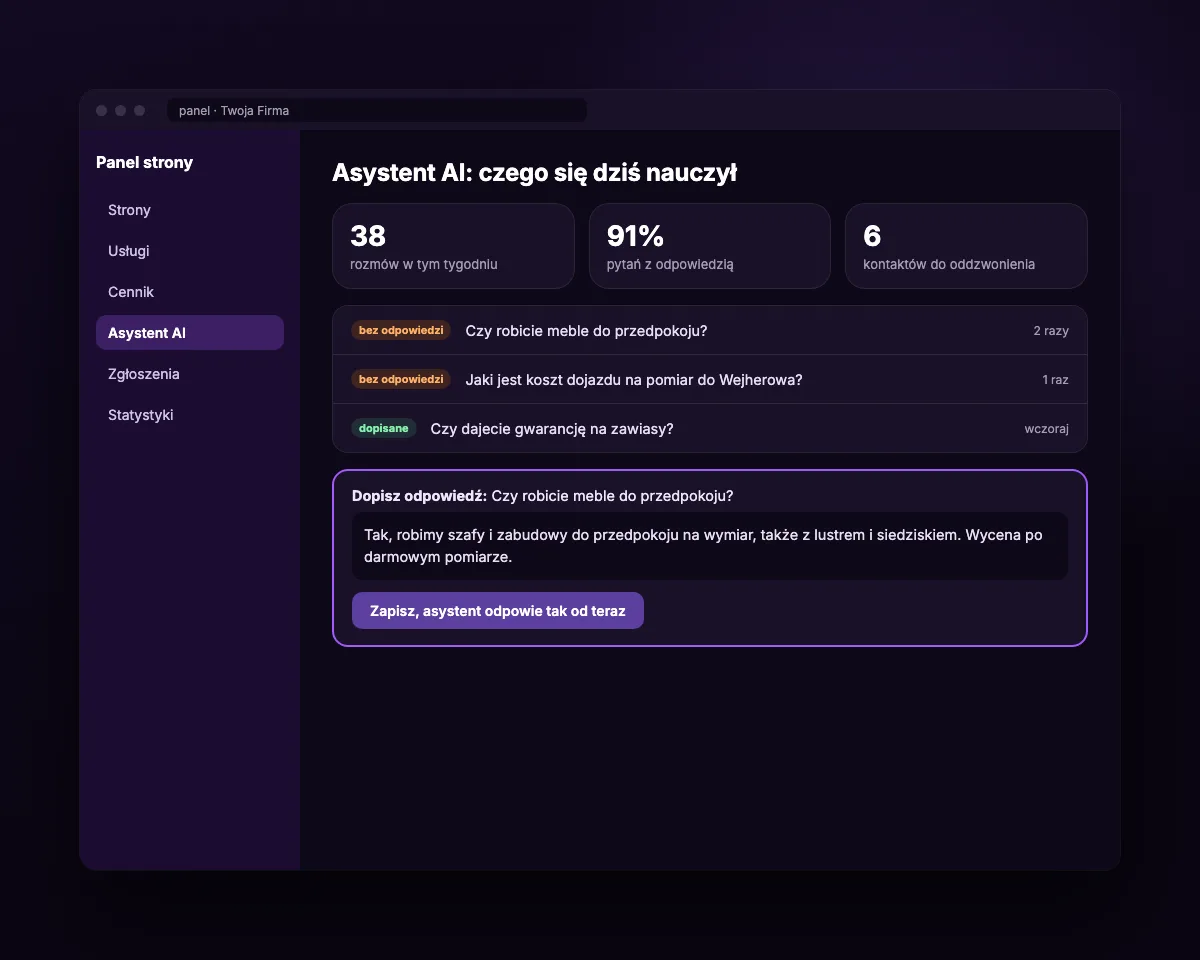
In the panel you can see what customers ask about and which questions the bot could not answer. You add an answer once, in one sentence, and from then on the bot gives it to every next customer.
It is the best list of content ideas you can have, because it comes from real customers. The questions that come back most often are worth adding to the FAQ on the site. Then the answer is seen not only by the person talking to the bot, but also by Google and AI search engines.
- Unanswered questions: gathered in one place, with the number of times each was asked
- Your words: the bot repeats your answer, not its own guesses
Comparison
How much does an AI chatbot for a website cost
Net prices. You can pay once or choose a subscription with AI costs already included.
| Topic | Typical subscription AI chat | ITAMA: one-off setup | ITAMA: monthly subscription |
|---|---|---|---|
| To start | you set it up yourself | from 2000 zł one-off, I set it up | setup quoted separately, I set it up |
| Every month | usually from about 150 zł for 50-100 AI conversations | you pay for AI credits yourself (we help connect the account), usually a dozen to a few dozen zł | from 99 zł subscription a month, AI credits included |
| Conversation limit | usually 50-100 AI conversations included | you set the spending limit on the AI account yourself | up to 300 conversations a month, then the bot gives your phone number and the form |
| How the bot knows the business | you enter the knowledge separately | from your website's content, it updates itself | from your website's content, it updates itself |
| Customer contact | in a separate app | in the site panel and on your phone | in the site panel and on your phone |
Overview
How I set up a chatbot
- 1
A conversation about customer questions
We establish what customers ask most often, what the bot may promise and when it should hand the conversation over to you.
- 2
Tidying up the site content
I fill in the offer, the price list and the FAQ so the bot has something to answer from. The site's visibility in Google and AI benefits from this too.
- 3
Tests on real questions
I ask the bot several dozen questions, tricky ones included, and refine it until it answers the way you would.
- 4
Launch and review
I switch the bot on on the site, and after the first week we go through the conversations together and add the missing answers.
Honestly
What a chatbot will not do for you
The bot will not prepare a quote for an unusual job and will not replace a conversation with you. Its job is to answer simple questions right away and bring the customer to contact before they disappear. It does not promise discounts, dates or anything that is not on your website.
The customer always sees that they are talking to an AI assistant, because the law requires it and it is simply the honest thing to do. With a new website I deliver the site first, usually after 2-3 weeks, and add the bot the following week, once it has something to learn from.
Frequently asked questions
How much does an AI chatbot for a website cost?
Setup costs from 2000 zł net as a one-off. You then pay for AI credits (the fee for conversations) yourself, from your own account with the AI provider: usually a dozen to a few dozen zł a month for a small business. You can also choose a subscription from 99 zł net a month with AI credits included, up to 300 conversations a month. Once the limit is exceeded the bot does not disappear, it just gives customers your phone number and the form, and for higher traffic I suggest a bigger plan. A new website with a chatbot is usually 4500-5500 zł net.
Who pays for AI credits and what is an API key?
The chatbot uses an artificial intelligence service that is billed per use. With a one-off setup you pay for AI credits yourself, but you configure nothing: we help you open an account for your company, connect its access key (API) to the bot, and the bill for conversations comes directly to you. We set a limit, so the amount never exceeds what was agreed. On the subscription the account and AI costs are on my side.
How long does the setup take?
On an existing NEO Website the chatbot usually goes live within a week. With a new website the whole thing takes 3-4 weeks: I deliver the site first and add the bot a week later, after tests on its content.
Does the chatbot learn from my customers' conversations?
Not in a way you do not control. The bot does not turn conversations into its own knowledge. It learns when you add an answer in the panel or change the site content. That way you know exactly what it tells your customers.
What about GDPR and the data from conversations?
We keep conversations for an agreed period and only to handle enquiries. We add information about the chat to the privacy policy, and before launch we sign a data processing agreement. The bot asks for a phone number only when the customer wants to be contacted.
Will the chatbot work on my current website?
It works most fully on NEO Websites, because there the bot reads the offer and the price list straight from the panel. On another site, for example on WordPress, it can be embedded too, but the knowledge then has to be filled in by hand. I will check that after looking at your site.
Let's check what your customers ask about
Tell me what your business does and which questions you hear most often. I will tell you whether a chatbot will pay off for you and how much it will cost.